


UV Tan: Tanning & Sun Tracker
4.210.00 Reviews
App Specs
- Version
- v1.15.1
- Updated On
- License
- Free
- Downloads
- 50,000+
- Developer
- Emmett Deen
- Categories
- Weather
- Platform
- Android
Screenshots
 Analysis by AppCompare
I would treat UV Tan: Tanning & Sun Tracker as a planning aid, not permission to stay in the sun longer. Its focus on UV conditions and tanning makes it more specific than a general forecast app, but the sensible outcome is better preparation: knowing when to seek shade, use sunscreen, or change plans. No tracker can remove the risks of UV exposure, so I would keep skin protection ahead of any tanning goal.
Quick checks before you head out
The most useful way to fit an app like this into a day is to check it before committing to outdoor plans, then check again when conditions or timing change. A forecast viewed in the morning can help with broad planning; a later glance is more useful before a walk, lunch outside, or a trip to the beach. I would use the UV information as one input alongside the weather and my own comfort, rather than treating a single reading as a guarantee that exposure is safe.
There is also a practical distinction between planning a tan and planning time outdoors. If your real goal is a picnic, gardening, or a walk, the UV tools can still help you think about protection, even if tanning is not the point. That makes the app potentially useful beyond beach days, provided you approach its tanning language cautiously and do not let a suggested plan override basic sun-safety judgment.
Where a focused sun tracker fits
Compared with the usual weather app, a dedicated sun tracker puts UV-related decisions closer to the centre of the experience. A general forecast is usually the better choice when you mainly need rain timing, wind, or a broad view of the day. This app makes more sense when your question is specifically how outdoor conditions affect sun exposure and when to plan a break or protection.
That focus is a trade-off. A specialist tool can make a particular decision easier, but it should not replace a full weather service for every outing. I would check a conventional forecast for the wider picture, then use UV Tan for the sun-related part of the plan. If you only want temperature and rain alerts, adding a tanning-focused app may feel unnecessary; if UV exposure is a regular concern, the narrower emphasis is the point.
What I would watch during a long day
For a day with several stops, I would avoid treating a morning plan as fixed. A long stretch outdoors can include changing shade, activity, and exposure, so I would build in breaks and reassess rather than trying to follow a tanning target continuously. The practical benefit of reminders is greatest when they interrupt the day before you lose track of time; they are less useful if notifications are easy to dismiss or if you assume they replace applying protection when needed.
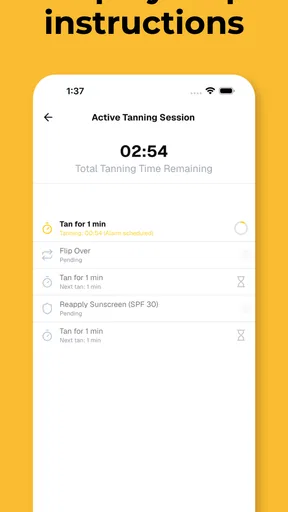
A small but useful habit is to decide your protection before leaving home: pack sunscreen, a hat, or clothing that covers you, and choose a shaded place for breaks. Then the app can support decisions instead of creating a last-minute scramble. I would also be cautious about interpreting any burn-timer estimate as an exact personal safety limit. Skin response varies, and changing conditions make a countdown a prompt to be careful, not a promise that exposure is harmless until it reaches zero.
Worth Reading Before You Choose

EA SPORTS FC Mobile 26 Is a Bigger Football Game, but It Takes Time

Flipboard Shows What News Apps Must Do Beyond the Feed

Switching to Android Auto Means Rethinking Your Driving Routine

Google Calendar Makes a Crowded Week Easier to Manage

Ludo King Makes the Most of the Minutes Between Plans

Baby Panda World Brings Quick Play to Modern Phones, but Its Game Library Feels Busy
Who is likely to get the most from it
I can see this being a better fit for people who regularly plan outdoor leisure around sunshine and want UV information alongside weather, especially if they appreciate having sun-related prompts in one place. It may also suit someone who tends to lose track of time outside and wants a reminder to pause and reassess. The value is less obvious for a person who rarely tans, already checks UV through another trusted service, or prefers to keep phone notifications to a minimum.
If you have a medical reason to limit sun exposure, are managing a skin condition, or are unsure how much exposure is appropriate for you, I would not use a tanning plan as personal medical guidance. Ask a qualified health professional for advice suited to your situation. The app can help organize everyday choices, but it cannot assess your skin or replace individualized care.
Speed, stability, and the limits of a phone
My expectations for speed would be modest and practical: I want a weather or UV screen to be easy to consult when I am about to leave, not something I need to study for several minutes. The simple dashboard described in the app’s experience is a sensible design choice for that kind of quick check. Still, perceived speed can depend on the phone, connection, and current app build, so I would not assume every screen will behave identically on every device.
For reliability, I would use the app as a helpful reference rather than the sole authority for a full day outdoors. Forecasts and UV conditions are time-sensitive, and a phone can be offline, low on battery, or inconvenient to check while you are moving around. Looking at the plan before leaving, keeping basic protection with you, and checking again when convenient is a more robust workflow than relying on constant access or a notification arriving at exactly the right moment.
Resource demands are another reason to keep expectations grounded. A quick check should not require leaving the app open throughout the day; I would consult it, make a plan, and close it rather than treating it as a live monitor. On an older or space-constrained device, the main question is whether the app runs comfortably and the display remains readable, not whether it can replace the phone’s built-in weather tools. The app is free to start, while in-app purchases range from $3.99 to $79.99 per item, so I would explore the basic experience before deciding whether any paid option is worthwhile.
A few details before installing
Emmett Deen is the developer, and the app is listed in the weather category. It is free to download, rated Everyone, and has an average rating of 4.2 from around 119 ratings, with 50,000 or more installs. It was released on April 11, 2025, and version 1.15.1 requires Android 7.0 or later. Those details make it accessible to many Android users, though compatibility still depends on the particular device and its software.
The AI-powered sun-safety wording may sound like a substitute for judgment, but I would see it as a way to make planning more convenient, not as a medical assessment. Before relying on any suggested timing, I would enter preferences carefully, check whether the advice makes sense for the day, and choose the more protective option whenever uncertain. That is especially important if you are travelling, spending much longer outside than usual, or moving between open sun and shade.
Ever wondered how to get that perfect tan without turning into a lobster or, even worse, missing out on the sunshine altogether? Look no further because the UV Tan: Tanning & Sun Tracker app is here to save the day. I recently gave it a whirl, and let me tell you, it's like having a personal tanning coach right on your phone.
Your Ultimate Sun Companion
The first thing that caught my attention with UV Tan: Tanning & Sun Tracker was its sleek and user-friendly interface. You don't need to be a tech wizard to navigate through it. The app welcomes you with a warm, sunny vibe that makes you want to hit the beach right away.
Features That Shine
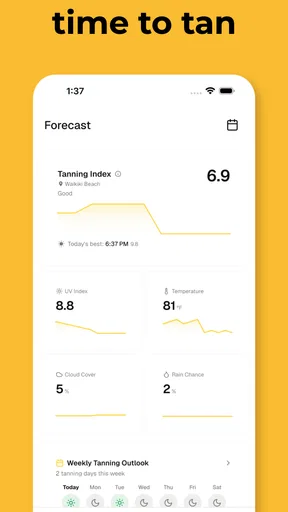
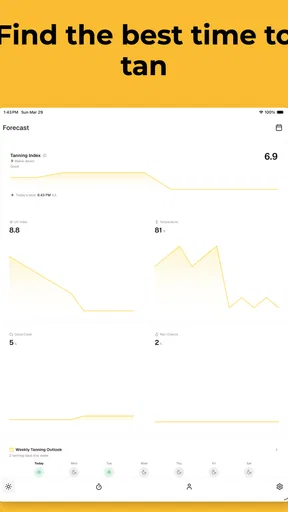
Alright, let’s dive into what makes this app a must-have for sun lovers. The app provides real-time UV index tracking, which is a game changer. No more guessing games about whether it’s safe to soak up some rays. The app gives you precise updates, so you know exactly when to step outside or stay in the shade.
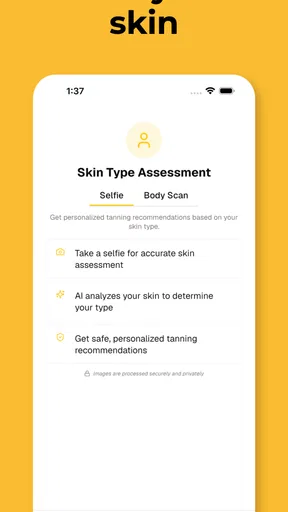
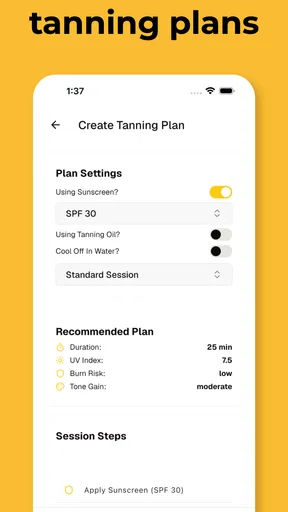
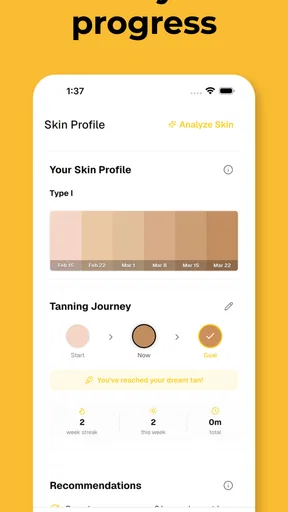
Another feature that I absolutely love is the personalized tanning plan. Yes, you heard it right. The app helps you create a tailored plan based on your skin type and tanning goals. It’s like having a personal tanning guru in your pocket. This plan adjusts according to the UV index, ensuring you tan safely and effectively.
Stay Safe, Stay Golden
One thing I’m always worried about is sunburn. Luckily, the app has got it covered. It sends timely reminders to apply sunscreen, so you don’t end up looking like a tomato. Plus, it provides tips on how to care for your skin post-tan, which I found super helpful.
Weather? Not a Problem!
A unique aspect of the app is its weather integration. It doesn’t just stop at UV tracking; it gives you full weather forecasts. So, if you’re planning a beach day, you can check if the weather will play nice. No more unexpected rain ruining your tanning plans!
Easy Peasy Usage
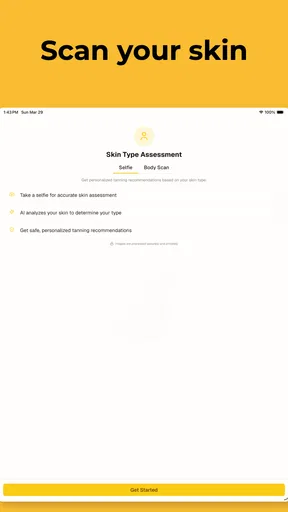
Signing up and setting your preferences is a breeze. The app asks a few simple questions to understand your skin type and tanning preferences. Once you’re in, the dashboard displays all the info you need at a glance. I appreciated not having to sift through endless menus to find what I was looking for.
The app also includes a community feature where users can share their tanning experiences and tips. It’s like a mini social network for sun chasers, which adds a nice touch of community spirit.
Why You Should Give It a Go
If you’re on the lookout for an app that helps you tan smartly and safely, then this is a no-brainer. Its real-time updates, personalized plans, and user-friendly interface make it a standout choice in the world of tanning apps.
In a nutshell, UV Tan: Tanning & Sun Tracker is your best bet for achieving that sun-kissed glow without the hassle or worry. It’s like having a personal weather station and tanning coach all rolled into one neat package. So, grab your sunscreen, fire up the app, and let the sunshine in!
My performance verdict
For a quick decision before going outside, a focused UV dashboard has a clear advantage over opening a broad weather app and searching for the relevant detail. The strongest case for this app is that it combines sun planning with ordinary weather context, while its compact, glanceable approach suits short checks. I would not judge its usefulness by how long I keep it open; its value is in helping me make a plan and then get on with the day.
That does not make it an all-purpose weather replacement or a guarantee against burning. If I wanted detailed weather information above all else, I would keep using a conventional forecast service. If I wanted to avoid sun exposure entirely, I would prioritize protective habits rather than a tanning schedule. For someone who wants a dedicated way to think about UV while organizing outdoor time, though, it has a clear purpose. I would try the free experience, pay attention to how its suggestions fit my own routine, and keep the final decision firmly in my hands.
Pros
- User-friendly interface for easy navigation.
- Tracks sun exposure to prevent over-tanning.
- Customizable alerts for UV index levels.
- Offers personalized tanning recommendations.
- Integrates with health apps for better monitoring.
Cons
- Limited features in the free version.
- Requires internet for real-time UV updates.
- Battery consumption can be high.
- Some features need premium subscription.
- Occasional bugs affecting performance.
FAQs for UV Tan: Tanning & Sun Tracker
What features does UV Tan: Tanning & Sun Tracker offer?
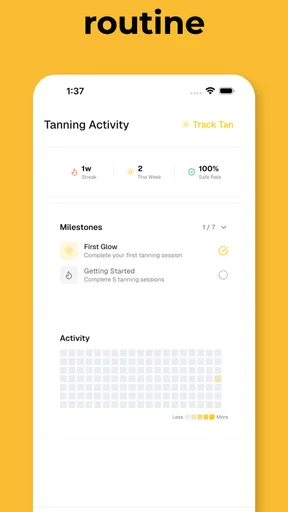
UV Tan: Tanning & Sun Tracker provides users with real-time UV index updates, personalized sun exposure recommendations, and a tanning progress tracker. It also includes reminders for sunscreen application and hydration, ensuring a safer tanning experience. The app's goal is to help users achieve an optimal tan while minimizing the risk of skin damage.
How does the app ensure safe tanning?
The app ensures safe tanning by providing real-time UV index data, which helps users determine the safest times for sun exposure. Additionally, it offers personalized recommendations based on skin type and tanning goals, along with reminders for sunscreen application to prevent overexposure and minimize skin damage.
Is UV Tan: Tanning & Sun Tracker suitable for all skin types?
Yes, the app is designed to accommodate all skin types. During setup, users input their skin type and desired tanning results, allowing the app to tailor its advice and recommendations accordingly. This personalized approach ensures that users receive guidance that best suits their individual tanning needs.
Does the app require internet access to function?
UV Tan: Tanning & Sun Tracker requires internet access to provide real-time UV index updates and weather forecasts. However, some features, such as the tanning progress tracker and sunscreen reminders, can be accessed offline once initial data has been downloaded. A stable internet connection enhances the app's functionality.
Are there any in-app purchases or subscriptions?
The app offers a free version with basic features, but users can opt for a premium subscription to unlock additional functionalities such as advanced analytics, ad-free experience, and personalized tanning recommendations. Pricing details and subscription options are available within the app, allowing users to decide based on their needs.


